
How to Get a Saudi Digital ID for Foreign Property Ownership
Saudi Arabia now allows eligible non-Saudis to apply for property ownership through the Saudi Properties portal. If you are outside Saudi Arabia and do not have an Iqama, you may first need to apply for a Saudi Digital ID through the Ministry of Foreign Affairs verification portal.
This guide explains the process based on my own application journey. I have submitted the request and booked my embassy appointment. I will update this article after I attend the appointment and receive the next steps.
Step 1: Go to the Saudi MOFA Verification Portal
Start by visiting the Ministry of Foreign Affairs verification portal:
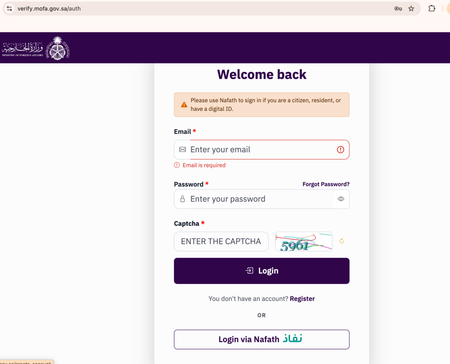
On the login page, you will see two options:
- Login with email and password
- Login via Nafath
If you are not a Saudi citizen or Saudi resident, you likely will not be able to use Nafath. Instead, you need to create an account.
Step 2: Create an Account
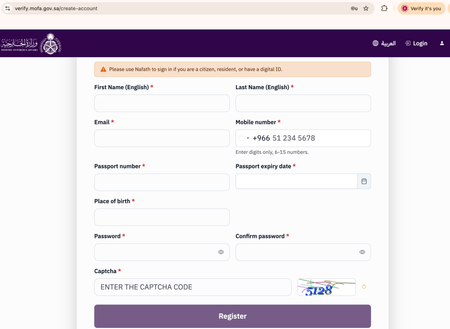
Click Register.
You will be asked to enter basic personal information such as:
- First name
- Last name
- Mobile number
- Passport number
- Passport expiry date
- Place of birth
- Password
- Captcha
After submitting the form, you will receive verification codes.
Important: You may receive a code by email and another code by phone. Complete both verifications.
Step 3: Login After Verification
Once your email and phone number are verified, you can login using your email and password.
For every login, the system may send a verification code to your email. This is normal.
Enter the verification code and continue.
Step 4: Create a New Request
After logging in, click New Request.
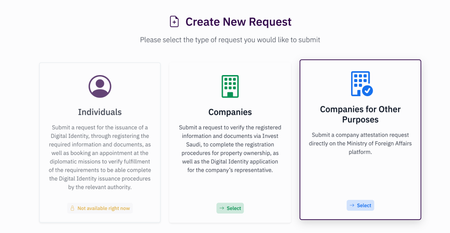
You will see different request types, such as:
- Individuals
- Companies
- Companies for Other Purposes
For most personal property ownership cases, choose Individuals.
If you are applying through a company, choose the option that matches your case.
Note: In my screenshot, the Individuals option shows “Not available right now” because I already submitted my request.
Step 5: Fill Out and Submit the Request
Fill out the required details and submit the request.
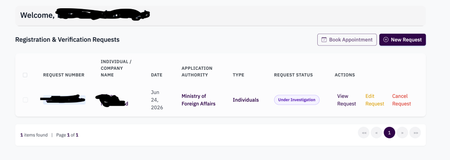
After submission, you will land on the Registration & Verification Requests page.
Your request status may show something like:
- Pending
- Under Review
In my case, the status shows Under Investigation as I have already booked an appointment at the Saudi Embassy.
Note: At this stage, you may notice that the Book Appointment button appears disabled.
Step 6: Enable the Book Appointment Button
This part is easy to miss.
On the request status page, select the checkbox next to your request.
Once you select the checkbox, the Book Appointment button becomes enabled.
Then click Book Appointment.
Step 7: Select Country, Embassy, and Appointment Date
After clicking Book Appointment, choose:
- Your country
- The Saudi embassy or consulate
- Available appointment date
- Appointment time
Then confirm the booking.
This appointment is for verifying your Digital ID request through the Saudi diplomatic mission.
What Happens Next?
At the time of writing this article, I have submitted my request and booked my appointment at the Saudi embassy.
My appointment is scheduled for next week. After I attend, I will update this guide with:
- What documents they asked for
- How long the appointment took
- Whether the Digital ID was issued immediately or later
- What happens after approval
- How the Digital ID connects to Saudi Properties
Quick Summary
If you are outside Saudi Arabia and want to apply for Saudi property ownership, the process may look like this:
- Go to verify.mofa.gov.sa
- Create an account
- Verify email and phone number
- Login with email verification code
- Create a new request
- Select Individuals or the correct category
- Submit the Digital ID request
- Select the checkbox beside your request
- Click Book Appointment
- Choose your country, embassy, and appointment date
This Digital ID step is an important starting point for non-residents who want to continue the Saudi property ownership process through Saudi Properties.